What are project deliverables? Examples, definitions, and how to track them

A project can have hundreds of Jira issues, but that doesn’t mean you have hundreds of meaningful outcomes. Any project manager needs to know what the team is actually expected to deliver, when it is due, and whether it’s ready to hand over.
Basically, this is exactly what we call project management deliverables: concrete results stakeholders can review, approve, or use in their day-to-day work. In this guide, we’ll look at what project deliverables are, how to track project deliverables and report on them, how they differ from activities and milestones, and how to manage them effectively in Jira.
TL;DR
- Deliverables are project outcomes — the concrete results a project is expected to produce, not the individual tasks needed to create them;
- Define, plan, and track specific deliverables with clear acceptance criteria, an owner, dates, dependencies, and milestones;
- Report on outcomes, focusing on completed, upcoming, blocked, or at-risk deliverables to keep stakeholders informed and provide a useful view of project progress.
What is a project deliverable?
A project deliverable is a specific, tangible result that a project is expected to produce. It can be something you build, publish, launch, document, or hand over to a customer or stakeholder. The key is that a deliverable has a clear outcome: when it’s complete, there’s something concrete to review, approve, or use.
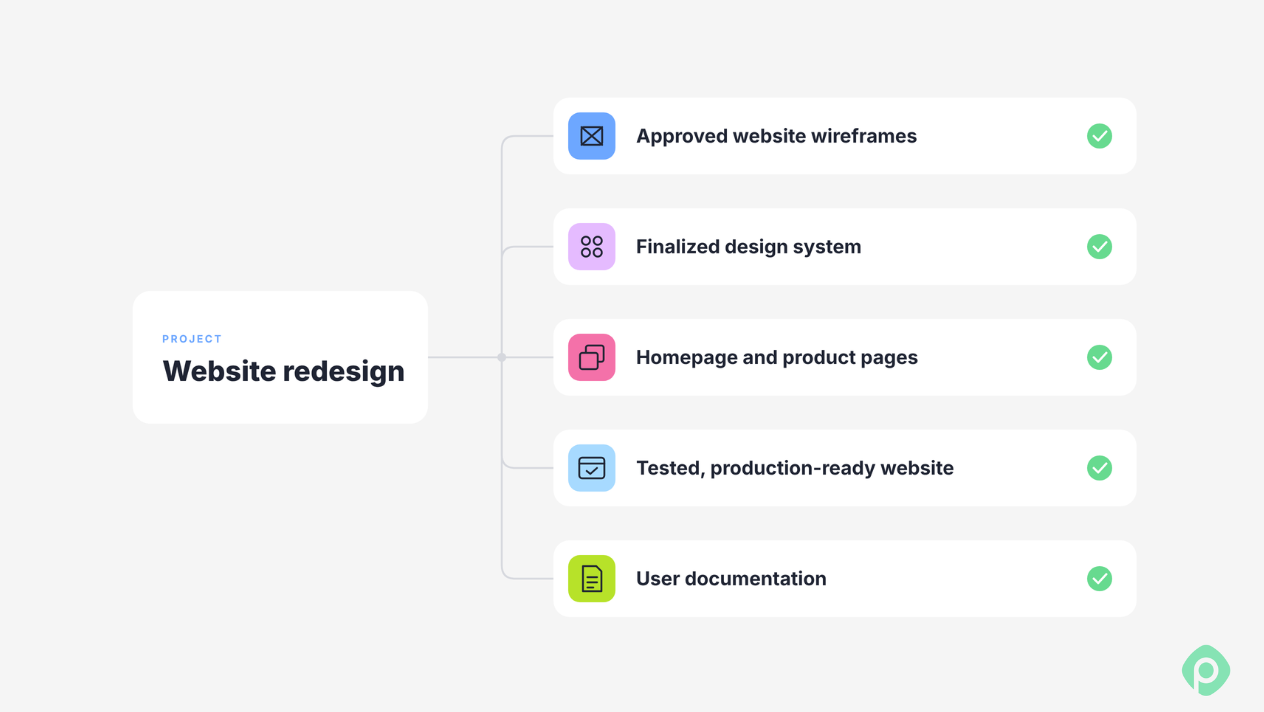
For example, if your team is redesigning a company website, the deliverables might be:
- Approved website wireframes
- A finalized design system
- Developed homepage and product pages
- A tested and production-ready website
- User documentation for the new site
Deliverables can be internal as well as customer-facing. Typical software development deliverables include a new feature, an API, or release notes, while a project team working on an internal process could deliver a new workflow, training materials, a completed project requirements document, or other process deliverables.
You can also split them into tangible and intangible deliverables: a tangible one is something you can hand over, like a website or a document, while an intangible one is a change you can measure, like a trained team, an improved process, or higher customer satisfaction. The exact types depend on the project objectives and stakeholders.
Project deliverables vs Milestones vs Activities
These three terms are easy to mix up, especially in Jira, where everything ends up as an issue and day-to-day task management can blur the line between the work and its result. They describe different levels of the project, though.
- An activity is work a team needs to do. For example, “Create homepage wireframes” or “Run accessibility tests.”
- A deliverable is the result of that work: “Approved homepage wireframes” or “Accessibility test report.”
- A milestone is a significant point in the project timeline, usually marking a completed deliverable or the end of important project phases. For example, “All design approved” or “Website ready for launch.”
Any time you feel stuck, just run through the following checklist:
| Concept | Test |
| Deliverable | Can you point to it and verify it exists? |
| Activity | Is it work done to arrive at the deliverable? |
| Milestone | Is it a checkpoint or marker of progress? |
How to identify project deliverables: 5 steps
Identifying deliverables early makes it easier to turn a broad project goal into something you can actually plan and track throughout project execution. Start with the outcomes, then work backward to the tasks required to produce them.
Start with the charter and high-level requirements
Go back to the project charter, the scope statement, and whatever high-level requirements exist. The question is blunt: what did we promise to produce? Deliverables that don't trace back to something in the charter are usually scope creep wearing a deliverable's clothes.
Ask stakeholders directly
Two questions do most of the work:
- "What do you expect to receive at the end of the project?"
- "What do you expect at each stage?"
These sound obvious, but they're rarely asked explicitly. Include the sponsor and steering committee in this conversation early, so stakeholder expectations are built into the definition rather than negotiated after the fact.
Create a WBS
A work breakdown structure (WBS) usually forces specificity. The lowest-level tasks usually point directly at a deliverable, even when the task itself is phrased as an activity.
Try decomposing "Develop a website feature” to see what we mean. Chances are, three separate deliverables will come out: the functional feature itself, its testing report, and its deployment script. These are three verifiable things, produced by one activity.
Once you’ve identified the deliverables, map them to the work items that will produce them.
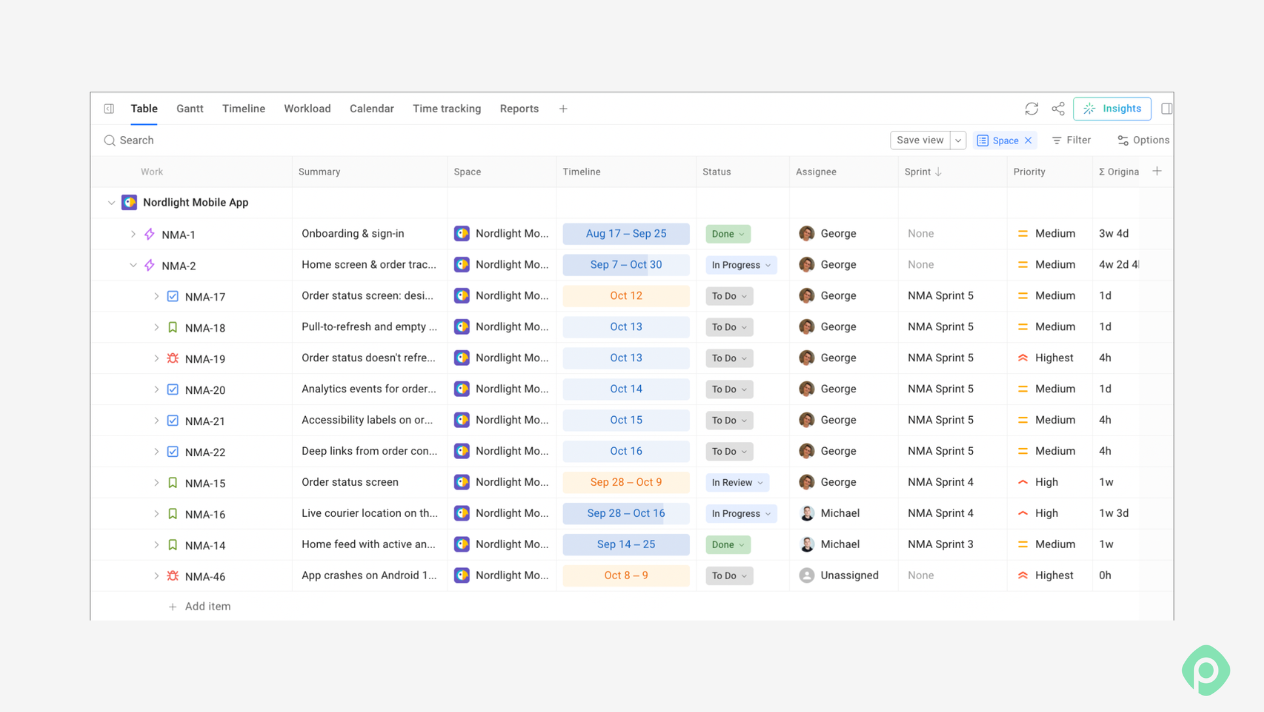
If you’re using Jira, you can do that with dedicated project management software like Planyway for Jira. Its Table view puts each deliverable at the top as an Epic, with its Stories, Tasks, and Subtasks laid out underneath in one table, so you don’t have to click through issue after issue to see what belongs where.
Don't forget supporting documentation
User manuals, training materials, test reports, deployment scripts, and process maps are deliverables in their own right, even though it's tempting to treat them as paperwork attached to the "real" deliverable. Leave them off the list, and they tend to get produced late, rushed, or not at all.
Validate against scope, budget, timeline, and approval
Check each item on your list against four things: is it in scope, is it within budget, is it within the timeline, and is it approved by the people who need to sign off?
If any of these fail, it doesn’t immediately mean that you defined your deliverable wrong, but it can be a sign that the item doesn’t belong on the list, or there’s a project scope problem.
What to keep in mind when you define a project deliverable
Once you have clearly defined deliverables, the next step is to go into specifics such as quality, format, owners, and deadlines.
Define the format, quality bar, and handover condition
Before work starts, settle three things:
- Format — it can be a document, code, a design file, a running service, or physical equipment
- Quality bar — can vary from "reviewed by a specific person”, to “passes a specific test”, or even “approved by a specific stakeholder”
- Handover condition — where does it go, and who signs off on receiving it?
Assign one owner to one deliverable
Assign a single accountable owner to each deliverable. Shared ownership functions as no ownership — when two people are equally responsible, neither one really is.
The owner doesn't have to do every piece of the work. They are the person accountable for getting the deliverable across the finish line and through handover.
Use two deadlines
As if one deadline isn’t enough, right? However, you’ll thank yourself later.
Assign every deliverable with two realistic deadlines:
- Internal complete date. This is when your deliverable is ready for a team review
- Handover date. This is when a stakeholder accepts your work.
Separating the dates makes the review and approval period visible. It also gives the team a more realistic picture of when the project can actually consider the deliverable complete.
How project managers track deliverables
Now that we have successfully defined our project deliverables, it’s time to track progress properly so nothing surfaces as a surprise at handover.
Three things matter most here: dependencies, capacity, and the feedback loop.
Tracking dependencies
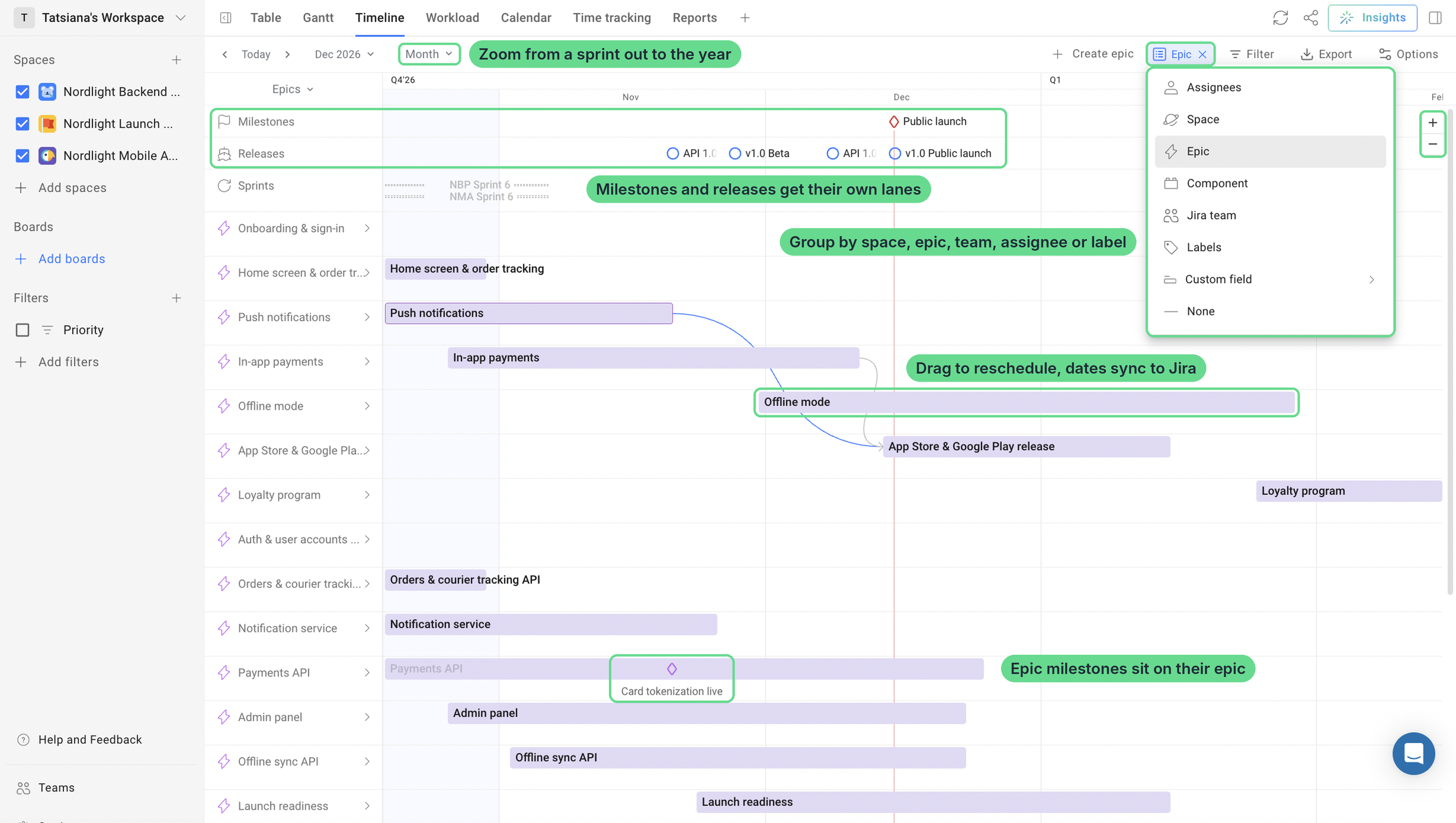
Most deliverables can’t start until something else is finished. The design system has to be approved before the product pages get built, and the site has to pass testing before the user docs can be finalized. When those links live only in someone’s head, a three-day slip on one piece turns into a late deliverable status update (at best), and nobody saw it coming.
So make the links explicit.
Check capacity
Deliverables usually get assigned to whoever looks available on paper, not to whoever actually has time this week. So before you commit to a date, check what each owner already has on their plate. Look at their scheduled work against the hours they really have, not just their task count.
This matters most when one person owns deliverables across several projects. At the project level, the team can look fine, while the same person is already juggling three other deadlines somewhere else. You won’t see that unless you look at each person’s total load, not only the share that belongs to your project.
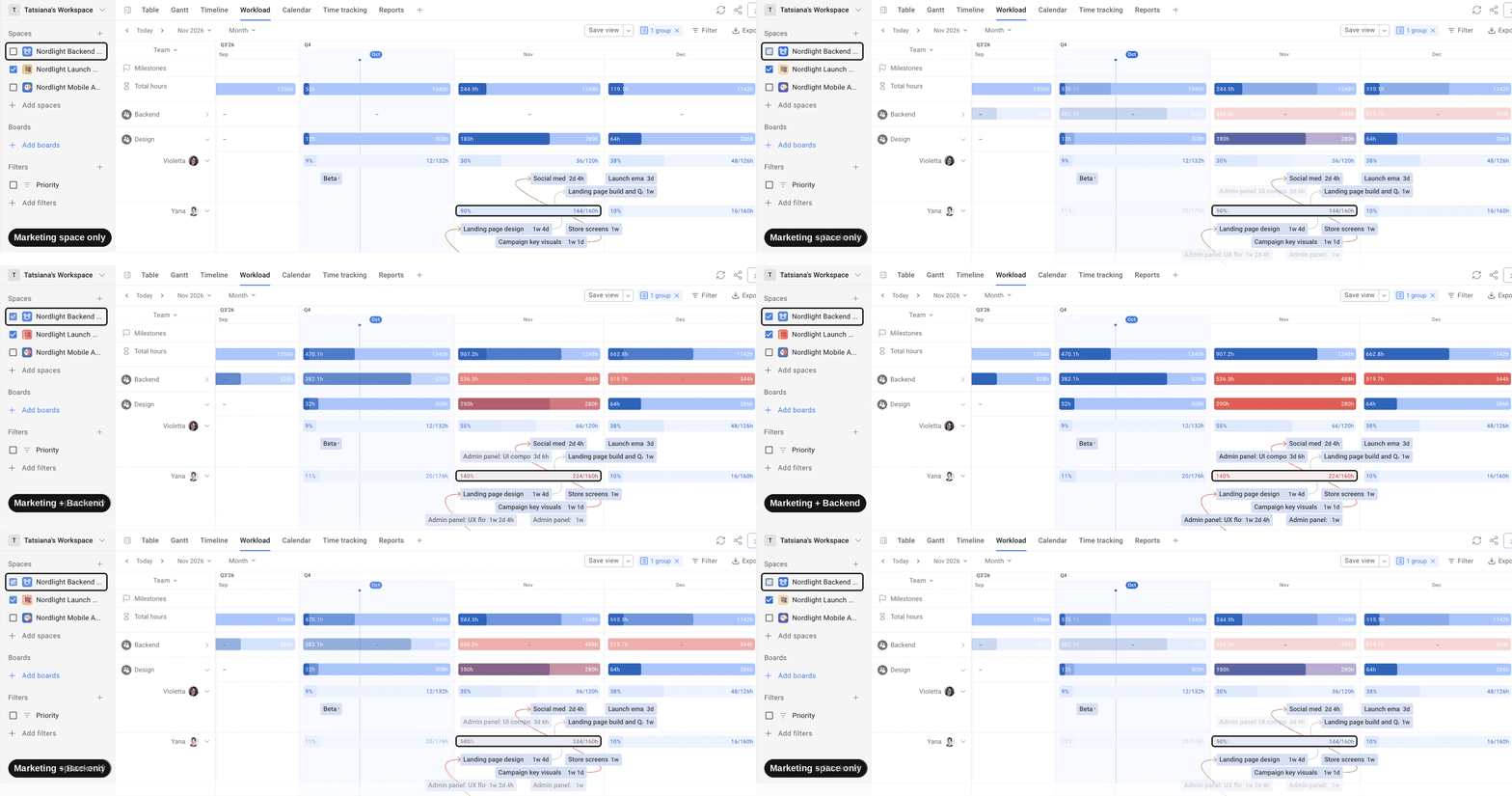
This is especially important when one person owns deliverables across several projects. A team may look underloaded at the project level while the same person is already carrying several deadlines elsewhere.
Close the feedback loop
Estimates only improve if someone compares them to what actually happened.
Logging time against a deliverable and comparing actuals to estimates turns "we thought it was done on time" into something verifiable. It also makes a consistently wrong estimate visible before it repeats across the next five deliverables.
The point isn't to make every estimate perfectly precise. It's to create enough feedback to see where planning assumptions regularly break down.
Put together, the workflow looks like this:
Define the deliverable with its acceptance criteria → assign one owner and both dates → check capacity before committing to the timeline → map dependencies and resolve any that overlap → track time as the work happens → confirm the milestone once the deliverable passes its criteria → move to the next one.
Reporting project deliverables done right
Stakeholders rarely care how many Jira issues have been done. In your reports on deliverables, focus more on what has been delivered, what is still in progress, and whether anything puts the delivery date at risk.
Deliverable health framework
For regular project reporting, you can also use a simple framework: “a status + forecast + risk”.
- Status: What is the current state of the deliverable?
- Forecast: Is it expected to be completed by the planned date?
- Risk: What could prevent that from happening?
Track deliverables against project milestones
Another useful technique is to connect deliverables to the milestones they support. This makes it easier to spot scheduling problems before they become missed deadlines.
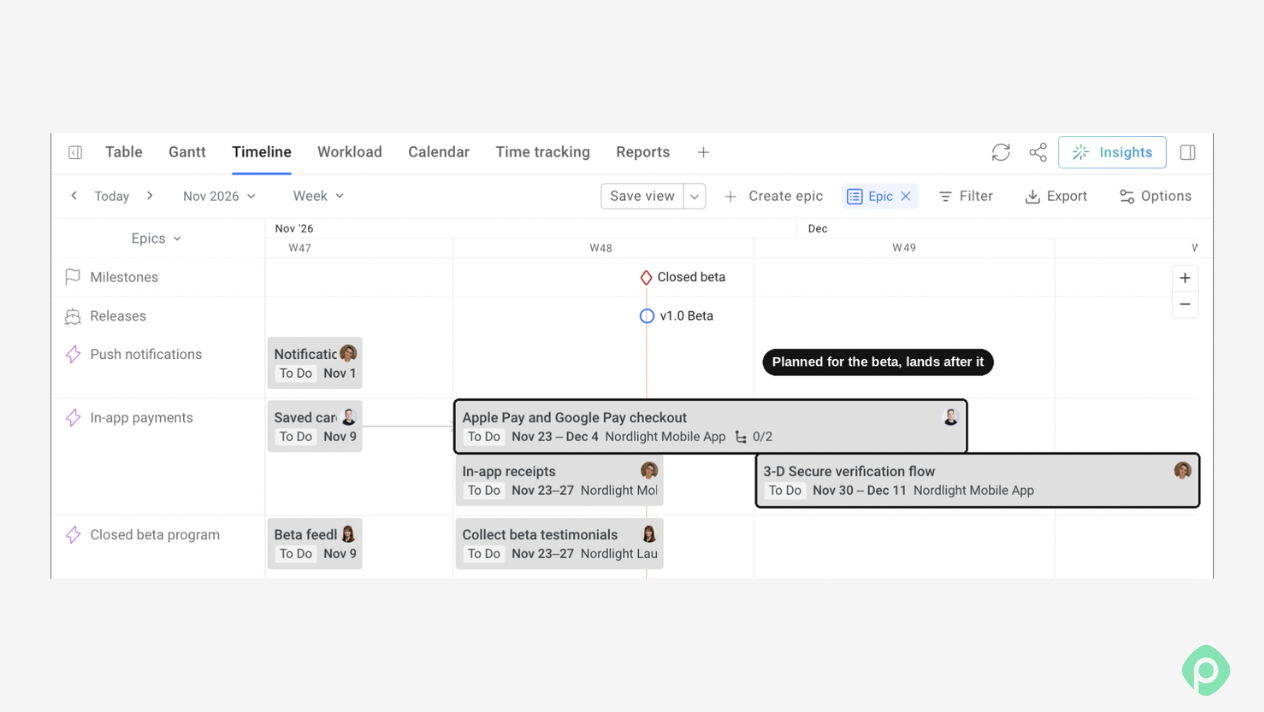
If your deliverables are already tracked on a project timeline, with their dependencies and workload visible, creating that report becomes much easier because you're reporting from the project data rather than reconstructing progress from memory.
Report exceptions, not everything
For recurring status reports, resist the temptation to list every deliverable and every Jira issue. If everything is presented with equal weight, important changes might get buried.
A better approach can be to highlight:
- Deliverables completed since the last report
- Deliverables due soon
- Deliverables that have changed status
- Deliverables forecast to miss their target date
- Blocked work or dependencies that could affect delivery
Common pitfalls in managing project deliverables
Deliverables can sometimes offer unpleasant surprises that could potentially undermine project success, cause scope creep, or even lead to missed deadlines. Here are some of the most common pitfalls you should watch out for when planning, identifying, and managing deliverables.
| Pitfall | What happens | Fix |
| Deliverables not tied to the charter | The project drifts, the scope expands, and stakeholders lose track of what the project produces | Define project deliverables from the charter, WBS, and stakeholder requirements |
| No deliverable named for a milestone | You track a checkpoint with nothing behind it, so missing work surfaces too late | Every milestone should name the deliverable it verifies |
| Fuzzy acceptance criteria | "Done" becomes a negotiation at handover | Write the format, quality bar, and sign-off condition before work starts |
| Shared or unclear ownership | No one is clearly accountable when the date slips | Give each deliverable one named owner |
| Capacity blindness | You commit to deliverables the team can't actually produce on time | Check real capacity before assigning work |
| Dependency blindness | An upstream delay silently cascades into a missed handover | Map dependencies visually and address risks early |
| No feedback loop | Estimates stay fictional and the same planning errors repeat | Track actuals against estimates and review them at milestones |
Deliverables are a discipline, not a checklist item
Understanding project deliverables isn’t complicated in principle. Every deliverable gets defined before work starts, owned by a single person, tracked with its dependencies and its owner's capacity in view, and verified against acceptance criteria written down in advance rather than improvised at handover.
Instead of creating another project-management checklist, make the project's final outputs visible from the moment they're defined to the moment they're accepted — it will help you monitor progress, move the project forward, and keep headaches away.
Project management tools like Planyway for Jira make that discipline visible day to day — key project deliverables, dependencies, and workload on one canvas, instead of scattered across tickets and memory.


FAQ
Project deliverables are the specific results a project is expected to produce. They can include a product, feature, report, document, design, or other tangible outcome. Unlike tasks, which describe the work, deliverables describe what that work produces.
There’s no universal set of five deliverables because they depend on the project. Common examples include project documentation, designs or prototypes, a developed product or feature, testing and QA results, and the final launch or handover.
Examples of deliverables include a completed website, mobile app feature, marketing campaign, technical specification, research report, training materials, or customer-facing documentation. A deliverable should have a clear outcome and defined criteria for completion.
For a website redesign, a deliverable might be an approved design system, while a milestone could be “Design approved.” Other examples include a developed checkout flow as a deliverable and “Beta release” as a milestone. The deliverable is the result, and the milestone marks an important point in the project timeline.
Deliverables are often grouped as internal or external. Internal deliverables include project plans, reports, and technical documentation, while external deliverables might include a finished product, feature, or client-facing report. The exact types depend on the project objectives and stakeholders.